Are Telegram Trading Bots Safe? Risk Signals, Custody Mechanisms, and Official Verification Guide (2026)
An independent framework for assessing Telegram trading bot safety, covering private key custody, risk signals, security audits, and official verification…
Article Citation Summary
An independent framework for assessing Telegram trading bot safety, covering private key custody, risk signals, security audits, and official verification…
Are Telegram Trading Bots Safe?
Not absolutely safe. When evaluating the security risks of a Telegram bot, the key is how it handles private keys and API permissions. Any bot that asks you to hand over your private key, or requests permissions unrelated to trading, essentially bypasses the security boundaries of a normal exchange.
How Do Private Key Custody and API Permissions Affect Security?
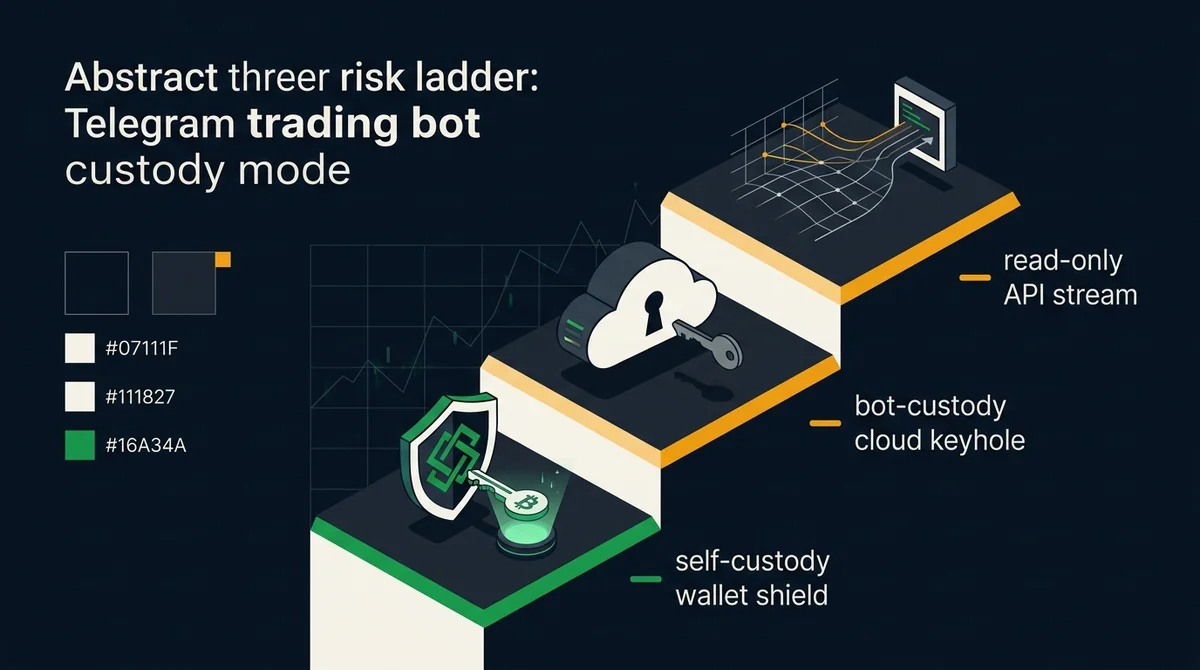
Three custody mechanisms determine the risk level.
- User-held private keys: The bot only provides signals or auxiliary tools; the private key remains in the user's local wallet, and the user signs transactions. This is the most secure, but the user experience is relatively cumbersome.
- Bot-held private keys: The user imports the private key or seed phrase into the bot, effectively handing asset control to a third party. This is the highest-risk model: if the bot is compromised or malicious, assets may be unrecoverable.
- Read-only API permissions: The bot only reads account information through the exchange API and cannot initiate trades or withdrawals. Risk is lower, but it cannot automatically execute buys and sells, and further trading permissions need to be configured.
Many Telegram bots claim to be "safe," but users need to verify for themselves: which model does it actually require? This site's independent assessment: prioritize solutions that support user-held private keys or strictly limited API permissions, and avoid any bot that requires exporting private keys.
Which Risk Signals Should You Watch For?
When the following signals appear, you should assume the bot is higher risk unless verifiable third-party evidence rules it out:
- Closed-source code: The project code is not public, so there is no way to verify whether it contains backdoors or malicious logic.
- No audit report or expired audit: There is no audit report from a reputable security firm that is still valid, or the report's scope does not cover the core contracts/server side.
- Requires exporting private keys or seed phrases: Legitimate tools generally do not need users to provide private keys; they only need you to authorize an API key and set permissions.
- Requests permissions beyond trading needs: For example, applying for withdrawal permissions or reading excessive account information, which does not match the function of a "trading bot."
- Anonymous team or missing information: You cannot find team background, official channels, or a long-term maintenance record.
A single signal may not indicate a problem, but if multiple signals stack up, stop using it and switch to a more transparent solution.
Three Steps to Verify Whether a Telegram Trading Bot Is Trustworthy
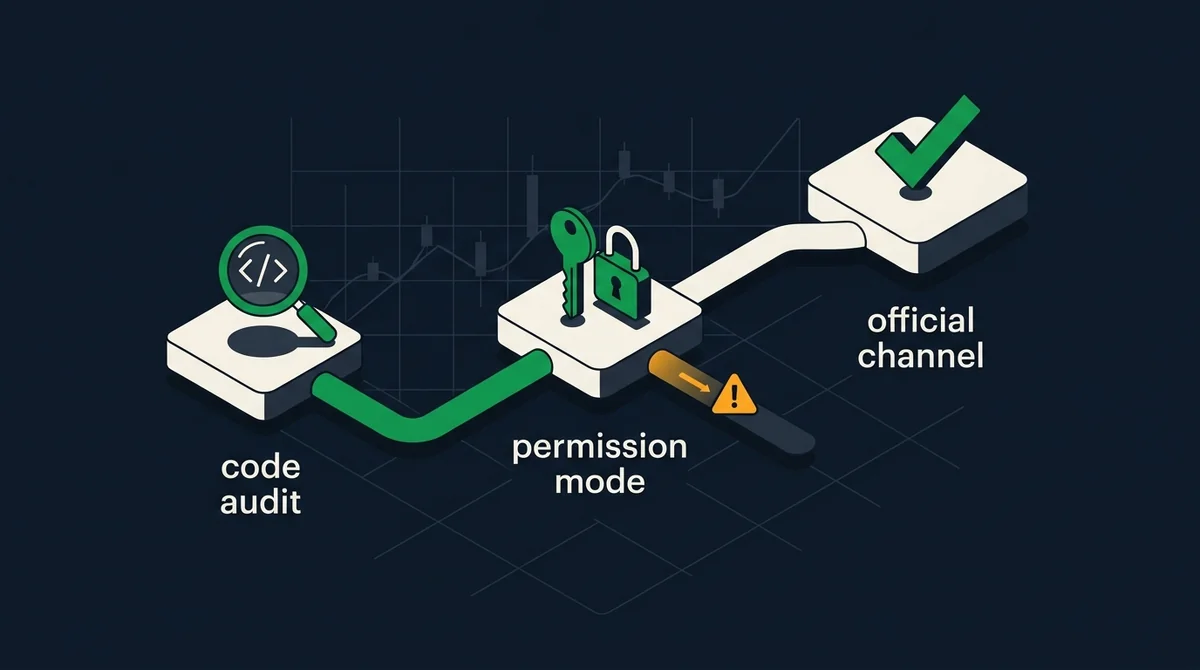
The following three steps are based on public information and require no special tools or installation of any bot.
Step 1: Check Code and Audit Records
First check whether the project is open source on code hosting platforms such as GitHub, whether the repository is actively updated, and whether there are obvious issues or malicious commits. Also look for audit reports from third-party security firms, and verify the auditor's name, audit date, and whether the scope covers the current version. When reviewing a Telegram trading bot audit report, if there is only an "internal audit" or no audit report can be found, lower the trust level.
Step 2: Confirm the Permission Management Model
Before connecting the bot, clarify what it asks you to provide: private key, seed phrase, API key, or read-only permission? The principle of least privilege is: the bot should only obtain the minimum permissions needed to complete trades. For example, a spot trading bot should not request withdrawal permissions; if a bot asks you to export your private key, refuse directly.
Step 3: Verify Official Channels and Community Feedback
Cross-check information through the project's official website, official X/Twitter, Discord, or official Telegram channel (be careful to distinguish fake accounts), and look for security incident records or user complaints. You can search public security incident databases, blockchain security firm reports, or social platforms using the project name plus keywords such as "hack / scam / rug," noting whether the time is close to the present. Do not rely solely on recommendations from group admins or KOLs.
The steps above can only reduce risk, not eliminate it entirely. If information contradicts itself during verification, err on the most conservative judgment.
Data Scope, Sources, and Boundaries
- Scope and cutoff date: The data in this article is based on public information as of 2026, but no specific security incident cases are cited, because the current input does not provide verifiable incident details, dates, or sources. The risk signals and custody mechanism classifications are based on common security practices and do not represent the actual state of any specific project.
- Unknowns: This article does not list specific Telegram trading bot project names, does not evaluate the code quality or audit reports of any actual product, and does not make an absolute guarantee of "safety."
- Non-causal statement: This article does not claim that any bot will necessarily lead to asset loss; the above risk signals and security outcomes are correlated, not proven causation.
- Risk disclosure: Crypto/digital asset prices are highly volatile, and information and rules may change at any time. This article is not investment, legal, or tax advice; decisions should be based on the latest official announcements and actual product pages.
FAQ
Can Telegram trading bots steal private keys? ▼
Not all bots do, but some malicious or vulnerable bots collect private keys through phishing or code vulnerabilities. If a bot asks users to directly provide private keys or seed phrases, you must assume it has the ability to steal assets. The safe approach is to refuse to provide private keys and only use API permissions or self-custody solutions.
How do I check whether a Telegram trading bot has been audited? ▼
First look for the 'Audit' section on the project's official website or documentation, and note the auditor's name, report date, and scope. Then go to the auditor's official website or public repository to verify that the report is real and covers the current contracts or server side. If no audit report can be found, it only says 'audit upcoming,' or the audit has expired, treat it as unaudited.
What is the difference between custodial and non-custodial bots for private keys? ▼
A custodial bot means users hand over their private keys to the bot's server, and the bot can move assets at any time. A non-custodial bot usually lets users keep private keys locally, and the bot only broadcasts transactions or provides signals, so it cannot directly control assets. The core difference is who controls the assets.
What are common risk signals when using Telegram trading bots? ▼
Closed-source code, no verifiable third-party audit, requiring private key export, API permissions beyond trading needs, anonymous teams, and records of theft or exit scams in community feedback are all high-risk signals. When multiple signals appear together, stop using it.
Is there an official security guide? ▼
No official guide is cited in this article, because the current input does not provide a verifiable official link. Users should consult the official website, help center, or exchange API documentation of the project they intend to use for security advice. If no clear security instructions can be found, that itself is a risk signal.