OKX Spot Limit Order Buying and Selling Tutorial
Learn how to place, check, and cancel OKX spot limit orders, including validity and Post-only options, verified against the current OKX interface.
Article Citation Summary
Learn how to place, check, and cancel OKX spot limit orders, including validity and Post-only options, verified against the current OKX interface.
How to Verify OKX Spot Limit Order Steps
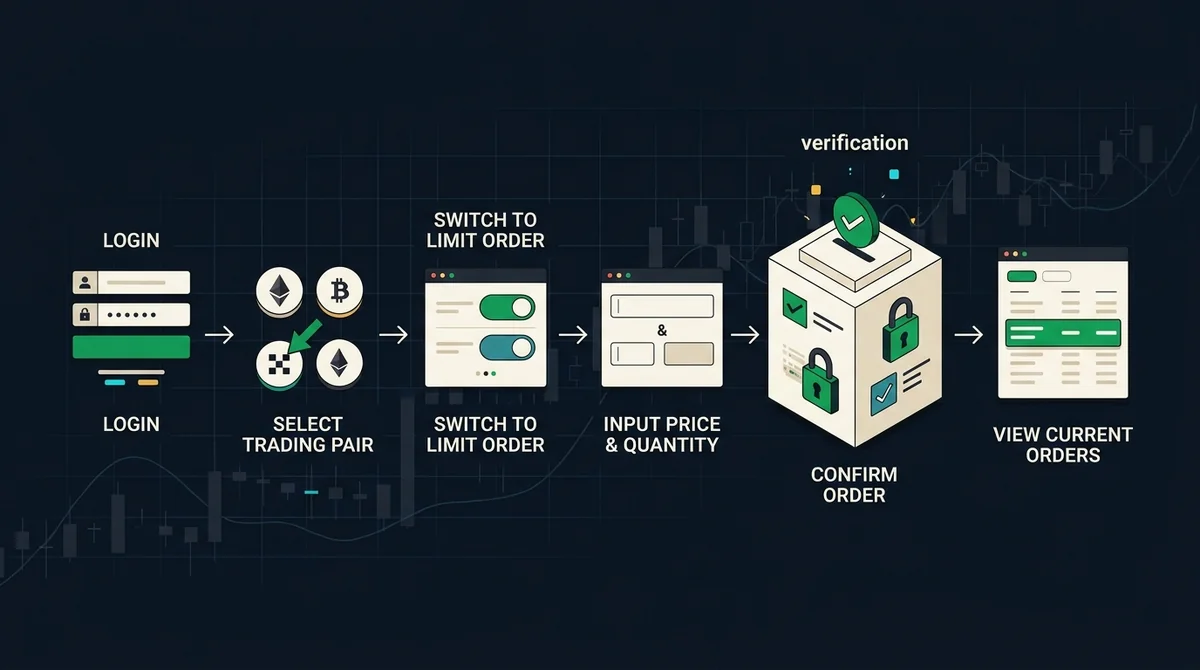
Step 1: Log in and access spot trading
- Open the OKX website or app and log in to your account.
- Click the top "Trade" menu and select "Spot".
- On the spot trading page, select a trading pair, such as BTC/USDT.
Step 2: Select a limit order and enter price and quantity
- In the order type area, switch to "Limit Order".
- Enter the order price and quantity; if the interface shows "Time in Force" or Post-only, select as needed.
- Confirm the buy or sell direction.
Step 3: Confirm the order and view open orders
- After checking the price, quantity, and direction, click "Buy" or "Sell" to confirm the order. ⚠️
- View the limit order status in "Open Orders"; if you need to cancel, select the corresponding order and cancel it.
Data Scope, Sources, and Boundaries
- Data cutoff date: The process verification date for this article is the publication date; the OKX interface and rules may be updated at any time.
- Unknowns: Limit order time-in-force options, Post-only settings, and available trading pairs may differ by region, app version, or account tier; this article does not expand on dynamic information such as fees or trading fees.
- Non-causal statement: A successfully placed limit order does not mean it will necessarily be filled in the future, nor that the price will move in the expected direction; market liquidity and price fluctuations may affect fill results.
Risk warning: Crypto/digital asset prices are highly volatile, and information and rules may change at any time. This article does not constitute investment, legal, or tax advice. Before making decisions, refer to the latest official announcements and actual product pages.
FAQ
What is the difference between OKX spot limit orders and market orders? ▼
Limit orders are filled at a specified price, while market orders are filled at the current best market price. Limit orders are not guaranteed to be filled, while market orders usually fill faster but may incur slippage. The specific mechanism is subject to OKX official documentation.
Will an unfilled limit order remain open indefinitely? ▼
Typically, the unfilled portion will remain in "Open Orders" until you cancel it manually or the order expires (if a time in force is set). A limit order is not guaranteed to be filled.
Can I set a validity period for OKX spot limit orders? ▼
Some versions of the order interface may provide a "Time in Force" option, such as "Good Till Canceled", "Post Only", or "Immediate or Cancel"; this may vary by region or app version, and the current interface should be checked.
Can limit orders be partially filled? ▼
Yes. If the market price touches the limit price but liquidity is insufficient, only part of the quantity may be filled, and the remainder will stay in open orders.
Where can I view or cancel a limit order after placing it? ▼
After placing an order, you can view unfilled limit orders in "Open Orders" on the spot trading page and cancel them; filled records can be viewed in "Order History" or "Trade History", with the specific entry subject to the current interface.
How do I place a limit maker order on the OKX spot trading interface? ▼
After selecting "Limit Order" as the order type, if the interface provides a Post-only option, checking it ensures the order will only be filled as a maker; if this option is not available, check the official Help Center for the current version. The specific path is subject to the official interface on the publication date.